Support Data Collector#
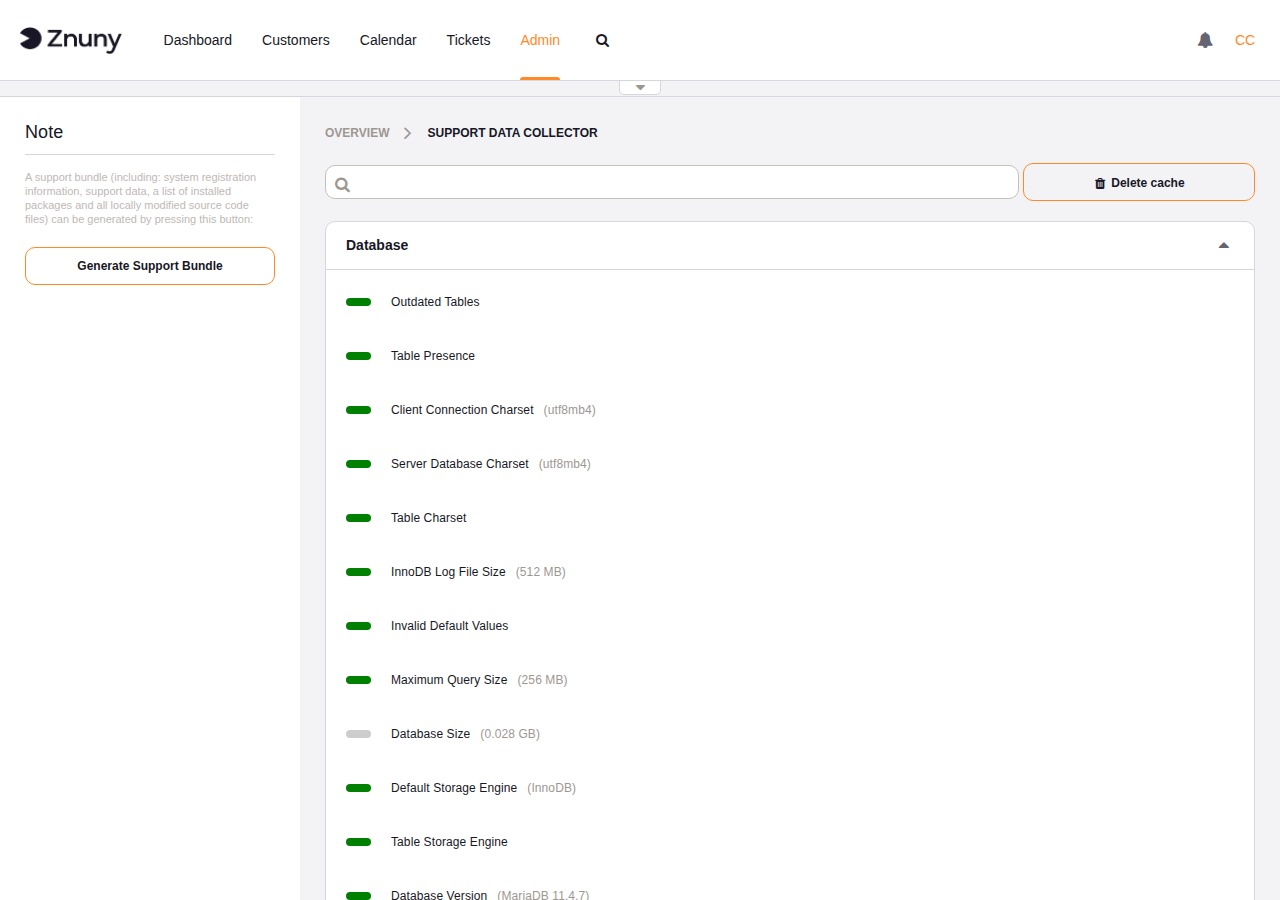
The Support Data Collector runs a set of automated checks against your installation and displays the results grouped by subsystem. Use it as a first step when diagnosing a problem or as a regular health check to catch configuration issues before they affect users.
Navigate to Admin → Support Data Collector to open the module.
Reading the Results#
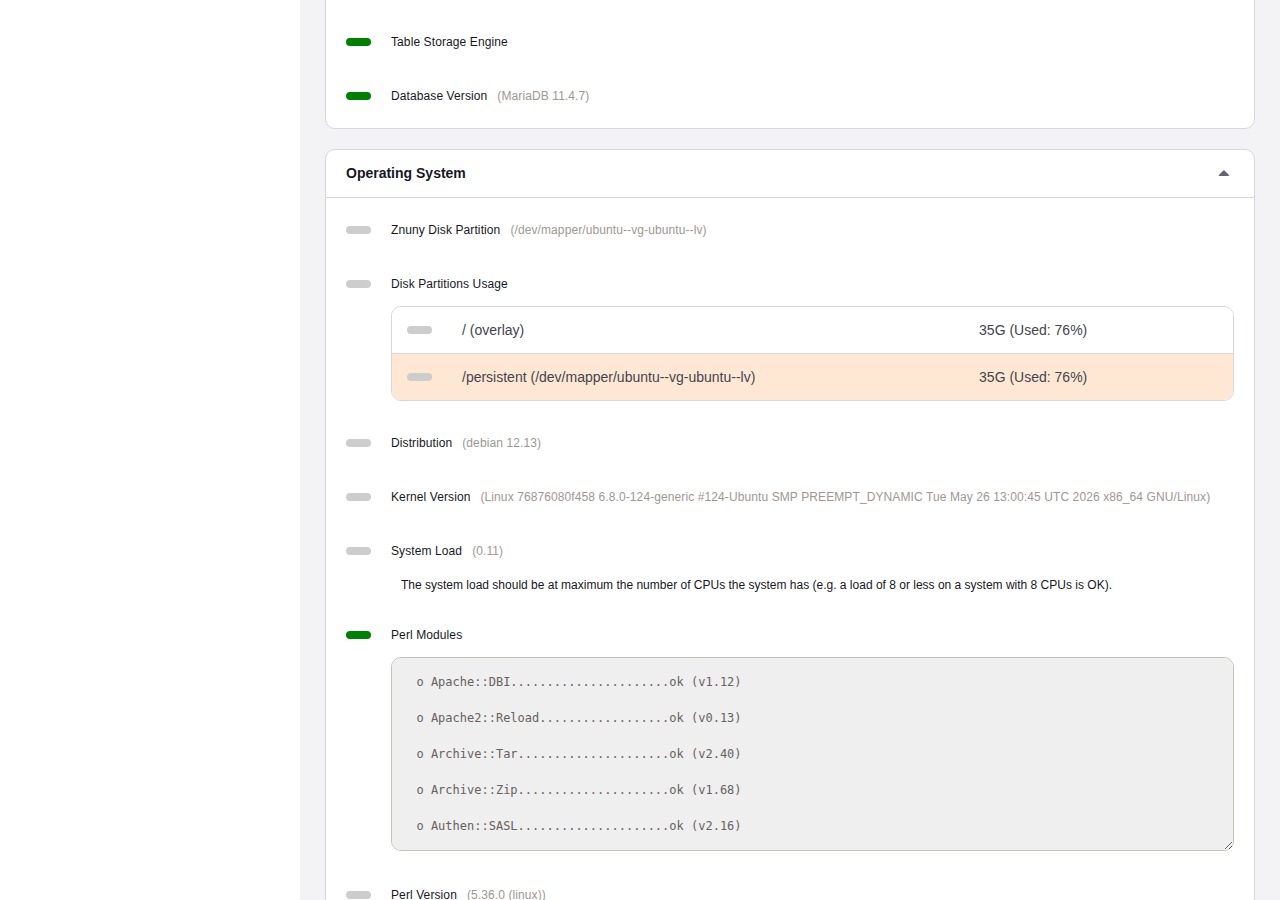
Each check is represented by a colored status indicator next to its name:
Indicator |
Meaning |
|---|---|
Green |
The check passed with no issues. |
Orange |
A warning — the system is functional but the value is outside the recommended range. |
Red |
A problem that should be resolved. |
Gray |
Informational — the value is reported for reference, with no pass/fail judgment. |
When a check has a message attached, it appears directly below the indicator. Expanded sub-groups (such as the Perl module list or disk partition table) are shown as inline tables within the group panel.
Check Groups#
The collector organizes checks into the following groups:
- Database
Schema completeness, table charsets, storage engine, database version, and size. Warnings here typically point to a misconfigured or outdated database server.
- Operating System
Disk space, disk partition assignment, system load, Perl version, and a full Perl module audit listing every required module and its installed version.
- Webserver
Apache modules, MPM model, environment variables, and whether an internal web request to the system succeeds.
- Znuny
Application-level checks including daemon status, FQDN configuration, default user and password status, email queue depth, spool mail count, article search index state, communication log account health, session configuration, package deployment integrity, and a list of installed packages.
Use the search bar at the top of the content area to filter by check name across all groups.
Refreshing the Data#
The collector caches its results to avoid running the full check suite on every page load. To force a fresh run, click Delete cache in the top-right of the content area. The page reloads and collects new data immediately.
Generating a Support Bundle#
The sidebar Generate Support Bundle button creates a compressed archive that captures the full state of your installation for troubleshooting. Generation runs in the background. When it completes, a dialog appears with a Download button — save the file locally. The archive is deleted from the server immediately after download.
Send this bundle when opening a support request with the Znuny team. It provides the diagnostic context needed to investigate installation-specific issues without requiring direct server access.
Bundle Contents#
The archive (SupportBundle_YYYY-MM-DD_HH-MM.tar.gz) contains four files:
SupportData.jsonA fresh run of all support data collector checks — the same data shown on screen, serialized to JSON. This run bypasses the cache so the data reflects current system state.
InstalledPackages.csvA comma-separated list of every installed add-on package with its name, version, MD5 checksum, and vendor.
ModifiedSettings.ymlAll SysConfig settings that differ from their shipped defaults. Only settings you have explicitly changed are included — the hundreds of unchanged default values are omitted.
application.tar.gzA nested archive containing every source code file in the installation directory that has been added or modified compared to the shipped version. Each file is checked against the MD5 checksums in the
ARCHIVEmanifest (and installed package manifests). Files whose checksums match the shipped version are excluded — only your local changes travel.
Privacy Protections#
Several categories of sensitive data are removed or masked before the bundle is created:
Passwords in configuration files
All files matching Kernel/Config.pm and Kernel/Config/Files/ inside the application archive are processed by the password masker before being written to the bundle. It replaces:
Simple settings such as
$Self->{'DatabasePw'} = 'secret'→$Self->{'DatabasePw'} = 'xxx'Hash-style entries such as
Password => 'secret'→Password => 'xxx'Credentials embedded in connection strings such as
://user:secret@host→://[user]:[password]@host
Passwords in modified SysConfig settings
The same masking logic is applied to ModifiedSettings.yml. Any setting whose name contains Password or Pwd, or whose type metadata marks it as a password field, has its effective value replaced with xxx before the file is written.
Ticket attachments and article data
The directory configured as Ticket::Article::Backend::MIMEBase::ArticleDataDir — which holds email attachments and article bodies stored on disk — is entirely excluded from the application archive.
Session data
The sessions/ directory is excluded. No active session tokens or session content are included in the bundle.
S/MIME keys and certificates
The directories configured as SMIME::PrivatePath and SMIME::CertPath are excluded. Private keys never leave the server.
Temporary files
The system’s TempDir is excluded.
Compiled caches
The js-cache/ and css-cache/ directories are excluded as they contain no configuration information.
Unmodified stock files
Because only files that differ from the shipped checksums are included, the application archive does not contain any unmodified Znuny source code — only the delta introduced by your local customizations.
Note
The bundle contains server paths, installed package names and versions, and system configuration values (with passwords removed). Review it before sharing if your organization has policies about disclosing infrastructure details.