Setting User Preferences#
Depending on your systems configuration, you can set preferences and logout using the user options menu at the top right of the screen. The user options menu is represented by a small icon that includes you registered gravatar, or user name initials.
Tip
You should always set your preferences first, as a new user. This will ensure that the system is configured to your liking.
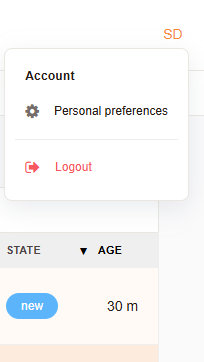
User Options Menu#
User Preferences#
Change Password: This option allows you to change your password.
Ticket Overview Refresh: This option allows you set a time in minutes for the ticket overview to refresh. The default is off.
Last view - types: This option allows you to select screens to be displayed in the last view area for quick access.
Interface Language: This option allows you to select the language for the interface. The default is English, unless otherwise set by the administrator.
Number of displayed tickets: This option allows you to set the number of tickets displayed per page in the ticket overview. The default is 25.
Time Zone: This option allows you to set the time zone for the interface. The default is UTC, unless otherwise set by the administrator.
Last View Limit: This option allows you to set the number of last view items displayed. The default is 5.
Note
Other options may be available depending on your system configuration. Speak to your administrator for more information.